

Correct an attendance record
Adding the punch somebody missed, fixing a wrong one, and what a record carries — the channel, the IP, the coordinate, the selfie, the person's own remarks against your manager remarks — plus the log that keeps every edit honest.
Somebody worked the day and forgot to sign out; the report now says Incomplete and their worked hours are short. The fix is not in the report — verdicts are computed from records, so you fix the record and the report follows. Attendance Records is the raw punch list, and the one place a punch can be added, edited or deleted by hand.
1. Find the record — or the gap
Open Attendance Records and filter to the person and day. Each row is one punch: Record Date, Type (Sign in / Sign out), Method — Manual for a punch somebody made, Auto for one recorded by a desk-booking check-in or a door opening — and the User.
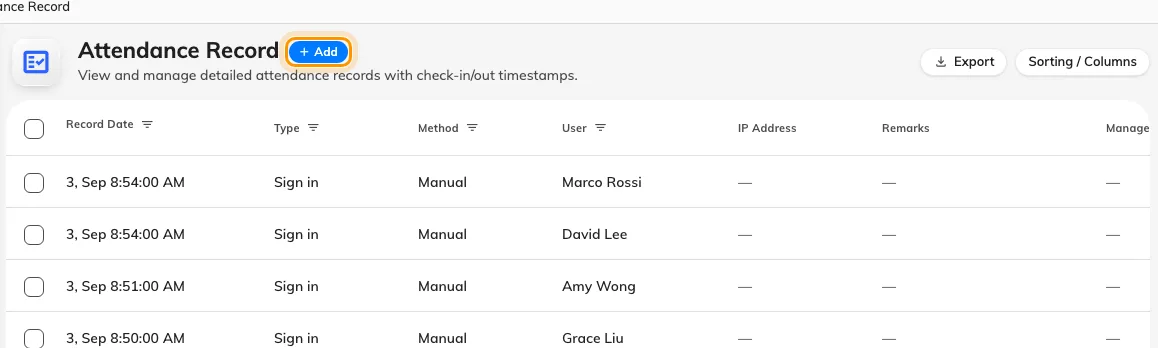
The punch list — one row per sign-in or sign-out, with its date, type and method. Add records the punch somebody missed.
Selecting a row shows everything the punch carried: the IP address and coordinate where the schedule demanded them, the person’s own Remarks (what they typed when signing in late), and the selfie where one was required — behind Click to view, because selfies are sensitive and are deleted automatically after the retention period on Selfie privacy.
2. Add, edit or delete
- Add — Record attendance creates the missing punch: pick the user, the working schedule, Sign in or Sign out, and the date and time it should have happened.
- Edit — fix the time or type of an existing punch.
- Delete — remove a punch made in error, such as the accidental sign-in blocking someone on a schedule that allows one per day.
Use Manager remarks to say why — “forgot to sign out, confirmed with team lead”. It is a separate field from the person’s own Remarks, so the two accounts never overwrite each other.
3. Check the report caught up
Open the attendance report for that schedule and month: the day should now carry its real verdict and its worked minutes. Nothing needs recomputing — the report reads the records as they are now.
The audit trail
Every punch and every correction is also a row in the Attendance log — who did what, when, from which interface — including Attendance record edited and Attendance record deleted entries. The log is read-only: it is the answer to “who changed this record”, and the reason a hand-corrected month is still defensible.
Open Attendance log