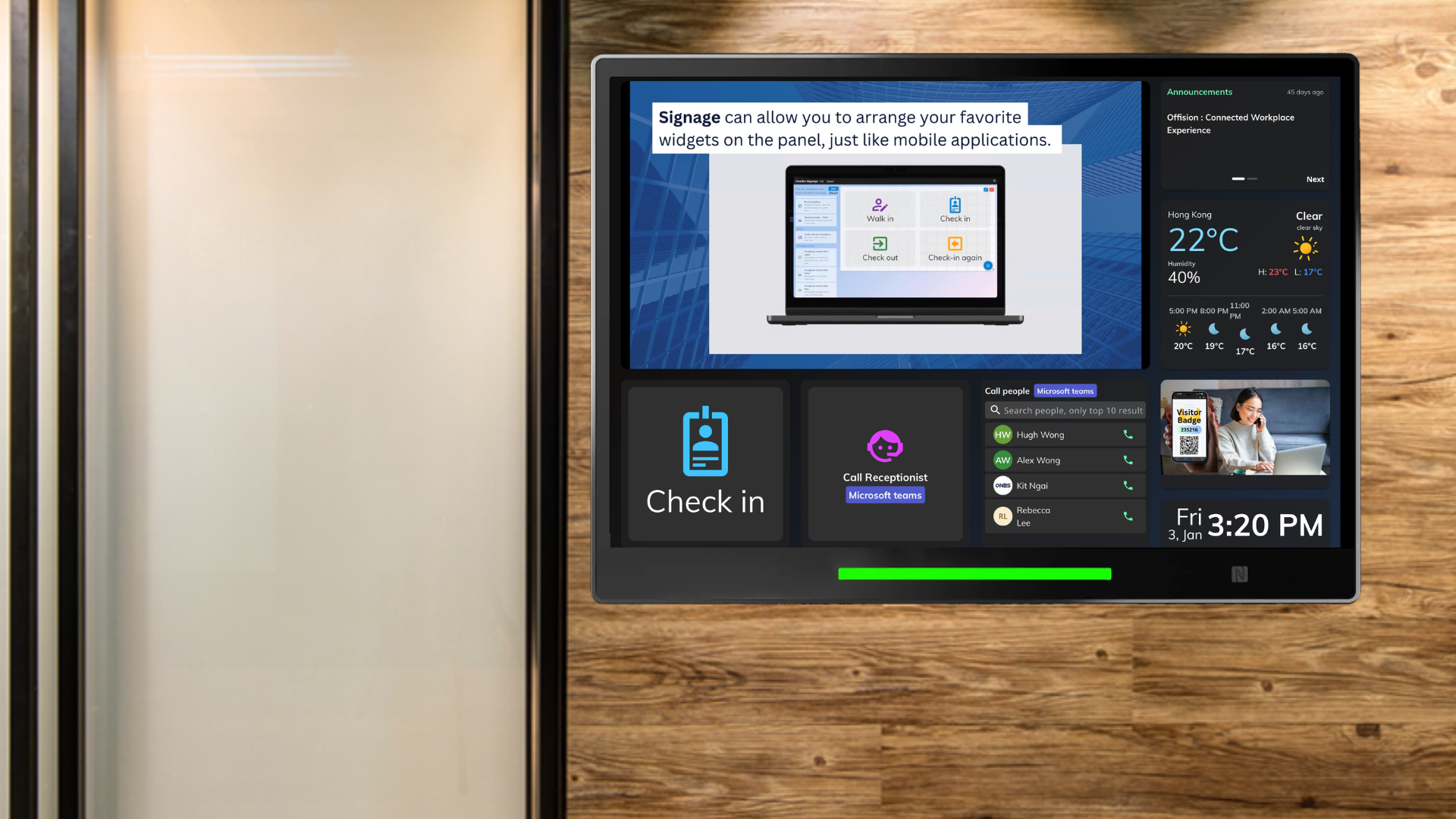
The Offision visitor self-service panel feature allows device managers to create an interactive and user-friendly kiosk experience for visitors. This can be tailored to serve your organization’s requirements through a variety of customizable widgets. Here's what you can do:
Create a Visitor Self-Service Kiosk: Use Offision’s tools to design a signage that doubles as a visitor kiosk.
Add Widgets for Visitor Interaction: Choose from a range of widgets specifically aimed at enhancing visitor interaction, such as:
- Visitor Self-Service Buttons: For walk-ins, check-ins, and check-outs.
- Teams Call Button: Enables visitors to call staff (e.g., receptionist, support staff) directly via Microsoft Teams. (Requires Teams integration).
- Teams Call People List: Displays a pre-configured Teams user list for visitors to select and initiate calls. (Requires Teams integration).
- Zoom Call Button: Allows visitors to call staff through Zoom. (Requires Zoom integration).
- Zoom Call People List: Displays a pre-configured Zoom user list for easy visitor access. (Requires Zoom integration).
- Walk-In QR Code Registration Form: Simplifies visitor registration by generating a scannable QR code for walk-ins.
Additional Widgets for Customization: Besides visitor-focused widgets, Offision offers other tools to enhance your kiosk, including:
- Clocks for time display.
- Announcement banners for important updates.
- Embedded YouTube videos for promotional or informational content.
By utilizing these features, you can ensure that your visitor self-service kiosk is both functional and highly engaging.
Pros:
Customizable Interface:
- Tailor the kiosk layout and functionality to meet specific organizational needs.
- Add widgets that align with visitor requirements for a seamless experience.
Enhanced Visitor Experience:
- Visitors can independently perform tasks like check-ins or walk-ins without needing staff assistance.
- QR code registration speeds up the process, reducing waiting times.
Integration with Popular Platforms:
- Offision integrates with Microsoft Teams and Zoom, enabling visitors to directly contact your staff.
- User lists ensure visitors can easily select whom to call, saving time and confusion.
Time-Saving for Staff:
- Automating visitor management reduces the workload for receptionists and support staff.
- Staff can prioritize other tasks while Offision handles visitor interactions.
Advanced Widget Options:
- Go beyond basic visitor management with widgets like clocks, announcements, and video content, enhancing the kiosk's utility.
- These additional features allow the kiosk to serve broader purposes, such as displaying company news or promotional materials.
Ease of Setup and Configuration:
- The intuitive interface ensures that even non-technical users can easily configure and customize the visitor panel.
- Widgets can be added or adjusted in just a few clicks.
Scalability and Flexibility:
- Suitable for organizations of all sizes, from small offices to large corporations.
- The modular design allows you to add or remove widgets as your needs evolve.
Professional Appearance:
- The self-service kiosk creates a modern and professional impression for visitors.
- Digital signage with interactive widgets demonstrates your organization’s commitment to innovation.
Cost-Effective:
- Reduces the need for additional staffing by automating visitor-related tasks.
- Streamlines operations, saving both time and resources.
Accessible for All Visitors:
- The intuitive design ensures that visitors of all tech skill levels can easily use the kiosk.
- The inclusion of familiar tools like Teams and Zoom makes the system widely accessible.
By leveraging Offision's visitor self-service panel, you can create a streamlined, efficient, and professional visitor management system that benefits both your organization and its guests.

 Neat
Neat
 Crestron