
Problems you recognise Floor space
Badge data limits
Access logs prove someone came in. They cannot tell you whether the shortage is desks, rooms, or the two large rooms everyone wants.
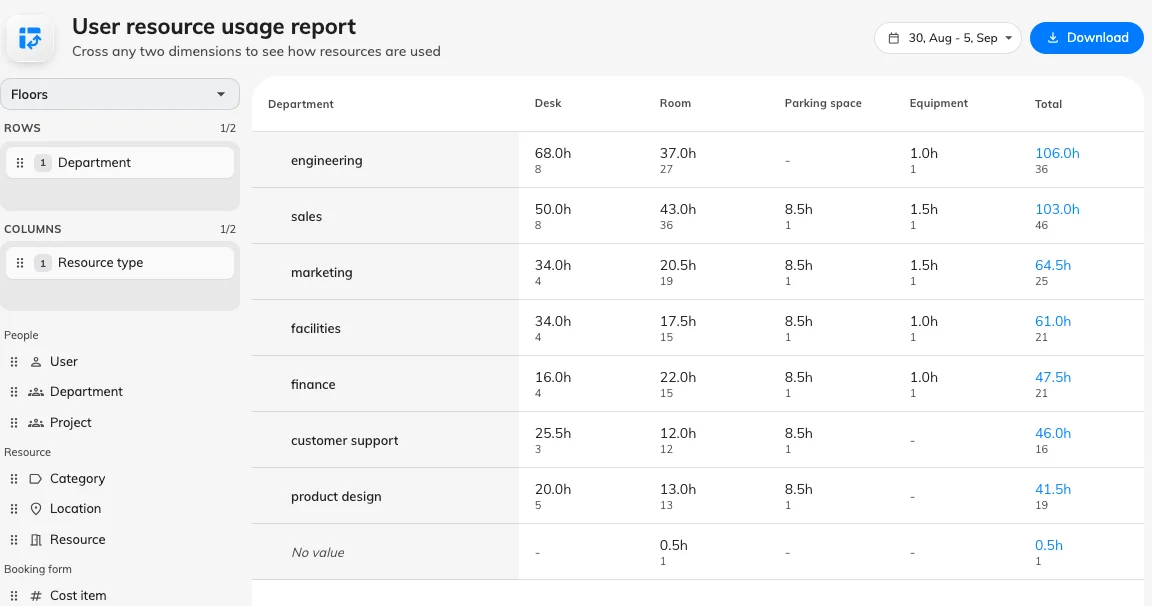
How room utilization reporting works
User resource usage and room-level reports measure which spaces were booked and checked in — desk and room shortage becomes visible without inferring it from building entry alone.
Common questions
Can we export this for a board pack?
Yes. Offision Analytics exports the underlying data and provides utilization charts and per-floor snapshots suitable for review meetings.


Part of a larger guide
The lease review is in six weeks and you have no numbers
Deciding on floor space with badge counts and a show of hands is expensive in both directions — too much space, and too little.
Full article ›Booked is not occupied
Booking data tells you what people intended. Without check-in or sensors it overstates real use, and every conclusion drawn from it is optimistic.
Read this guide ›Averages hide peaks
A floor at 60% average utilization can still turn people away every Tuesday. You need the distribution, not the mean.
Read this guide ›Agree on metrics
Utilization, occupancy, attendance and booking rate answer different questions. Mixing them produces a deck that does not survive challenge.
Read this guide ›See it against your own rooms
Walk through your estate, your booking rules and your calendar setup with our team — or start free and try it on one floor.