

Two rooms stay booked in Outlook after moving a single occurrence (open issue)
An open issue in Outlook and Microsoft 365. Moving one occurrence of a recurring meeting to a different room and then rescheduling the remaining occurrences leaves the original room still holding the moved occurrence. The extra hold is created in the room's mailbox, not in Offision's own booking data. How to confirm it, and how to release the room.
What happens
In a recurrence booked into one room, a single occurrence is moved to a different room. The remaining occurrences are then rescheduled. After that, the moved occurrence is held in both rooms: the room it was moved to, and the room it was moved out of.
Both rooms report the time as busy, so neither can be booked by anyone else.
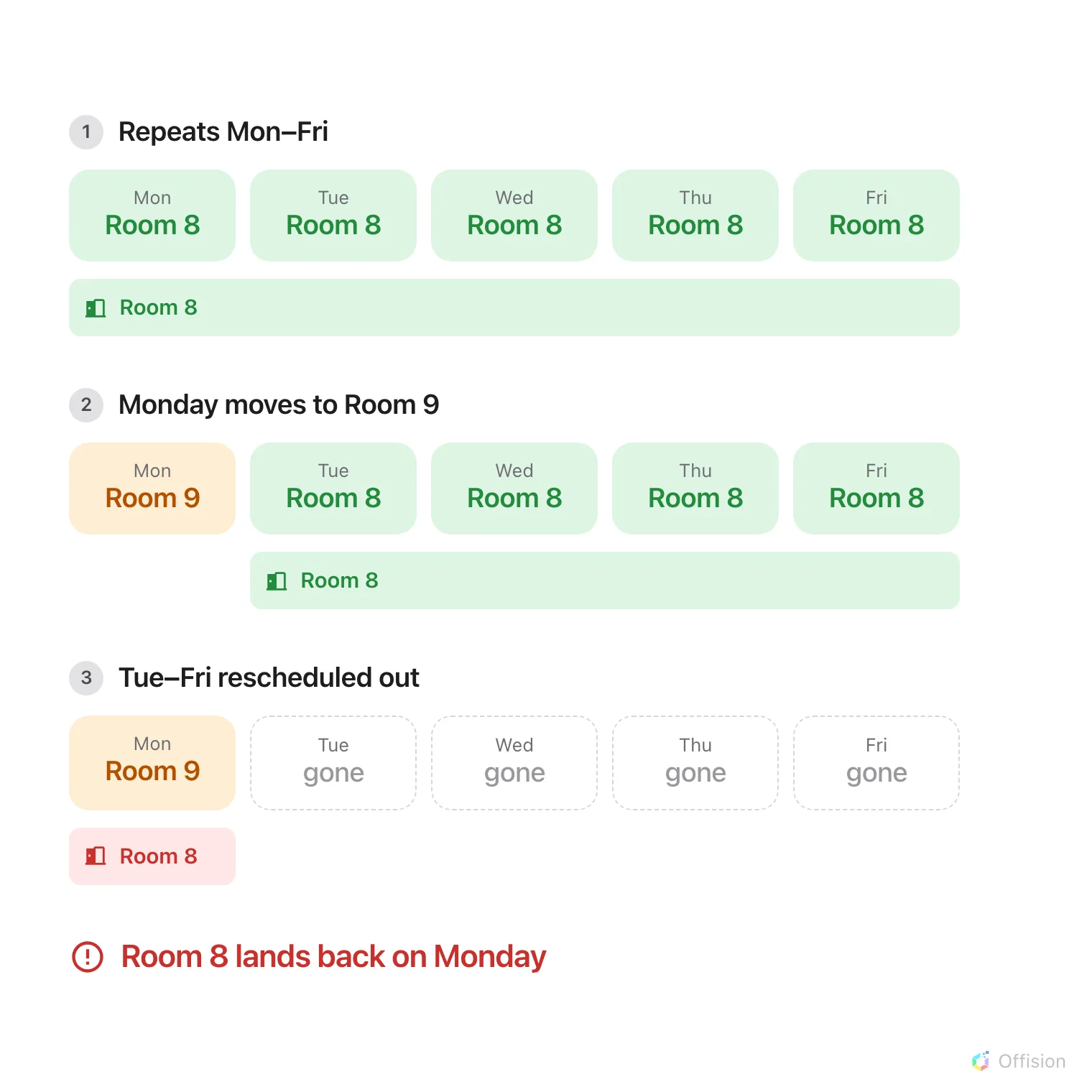
Rescheduling the rest of the recurrence leaves only the moved occurrence in it, and the original room's hold returns to that occurrence.
Where it comes from
The rooms’ availability is held in Microsoft 365, not in Offision. The extra hold is created there, and Offision reports it because a connected room’s availability is read from that room’s mailbox.
This has been reproduced directly against the Microsoft 365 calendar service with Offision taking no part, so it is not caused by booking rules, approval settings or synchronisation.
A room that is not connected to Microsoft 365 has no mailbox holding its availability, so there is no recurrence invitation to reinstate and this does not arise for it.
Why it happens
A room is invited to the recurrence, not to each occurrence separately.
Moving one occurrence to another room records an exception for that occurrence, and the original room correctly releases it. That remains correct for as long as the room still holds the other occurrences.
Rescheduling the remaining occurrences moves them into a separate booking. The original recurrence is then left containing only the occurrence that was moved away — and the original room’s release of it is reversed rather than kept.
How to confirm it
The organiser’s own calendar shows the moved occurrence in the new room only, and looks correct. The extra hold is visible only on the original room’s calendar.
Two things identify it. The original room holds an occurrence that no longer belongs to it, and the entry in that room’s calendar shows the other room as its location.
How to release the room
Cancel the moved occurrence, then create it again as a separate meeting in the room that is wanted. Cancelling releases both rooms. Check the original room’s calendar afterwards to confirm the time is free.
Where a single occurrence needs its own room and the rest of the recurrence is likely to be rescheduled, booking that occurrence as a separate meeting from the start avoids the situation.
Status
This is an open issue in the way Outlook and Microsoft 365 handle recurring meetings that have rooms attached. It is behaviour rather than a setting, so there is nothing to turn off in Offision. We are tracking it, and the steps above are reliable in the meantime.
A related behaviour is worth noting: changing the time of an entire recurrence returns any occurrences that had been moved to other rooms back to the original room, without notice. After that kind of edit, check the occurrences that were meant to differ.