

Managing office logistics just got easier. With the release of Offision v4.3, we are introducing a more cohesive way to manage both facility services and guest arrivals. These updates are designed to give your operational teams—from IT and catering to security and reception—the visibility they need to ensure every day runs smoothly.
📊 High-Visibility Daily Reports
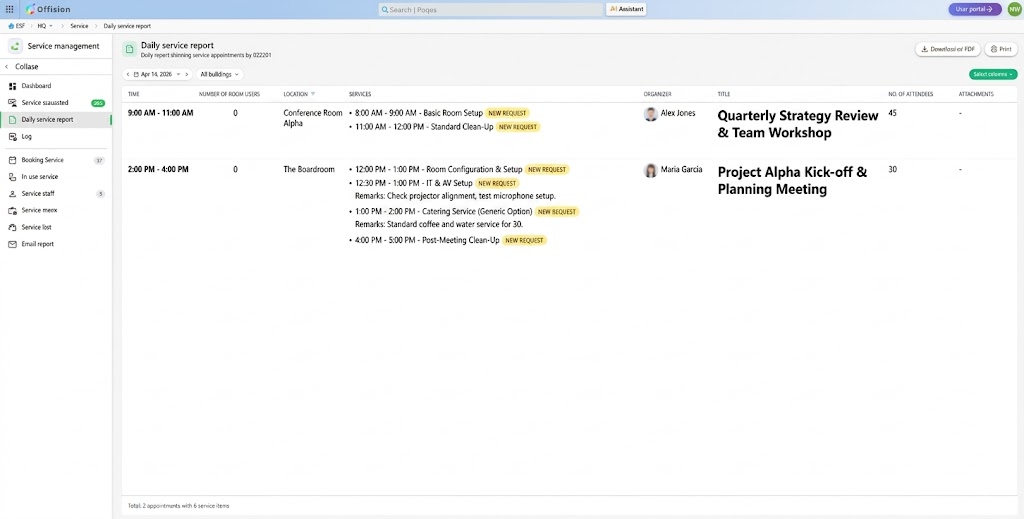
One source of truth for services and visitors.
We’ve overhauled our reporting dashboard to provide a real-time, chronological view of everything happening in your office. Whether it’s a VIP guest arriving or a complex room setup, your team can see it all in one place.
- Service Operations: Track room preparations, technical support requests, and catering needs. Spot “New Requests” instantly and read specific organizer remarks to ensure setups are perfect.
- Visitor Logistics: Monitor guest check-ins, expected arrivals (“Await” status), and check-out times. Identify the “Inviter” immediately to keep hosts informed of their guests’ arrival.
- Operational Clarity: Both reports offer time-sequenced logs, building-specific filters, and easy export/print options for compliance and security audits.
How it works: Navigate to Service Management > Daily Service Report for facility tasks, or Visitor Management > Visiting Daily Report for guest logs. Use the date picker to toggle between current and upcoming schedules.
📧 Automated Email Subscriptions & Forecasts
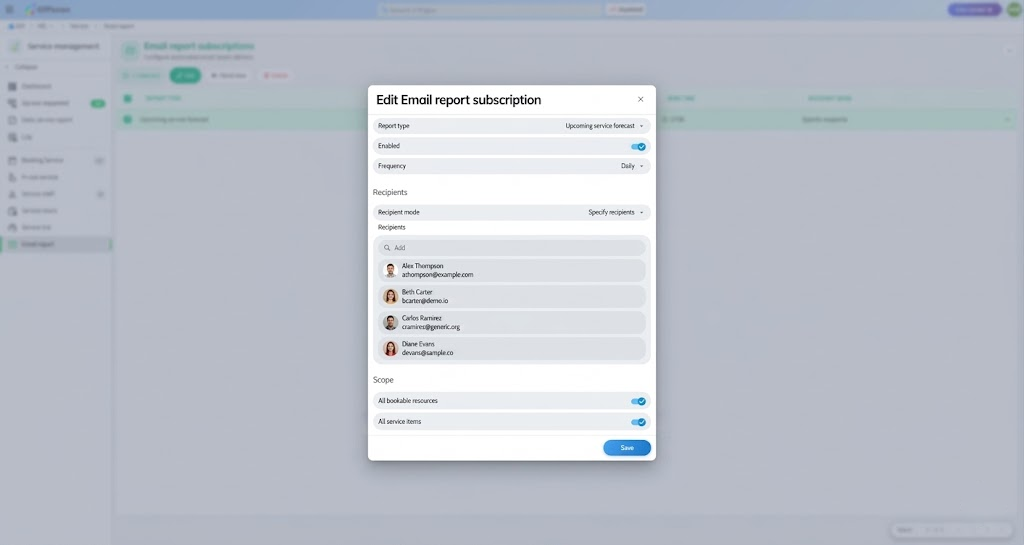
Stay proactive with data delivered to your inbox.
Stop chasing updates and start receiving them. You can now automate the distribution of service and visitor data, ensuring the right departments have the information they need before the workday begins.
- Customized Scheduling: Set reports to deliver at specific times (e.g., 8:00 AM) to the IT team, catering staff, or visitor managers.
- At-a-Glance Snapshots: The Upcoming Forecast emails provide a high-level summary of total service items, bookings, and expected visitors, allowing for better inventory and staffing decisions.
- Flexible Controls: Toggle “Scope” to include all buildings or filter for specific resources, ensuring recipients only see the data relevant to their role.
How it works: Visit the Email Report tab in either the Service or Visitor Management sections. Click Add/Edit to select your report type (Upcoming Forecast), set your frequency, and add recipients.
Why this matters
By centralizing Service Requests and Visitor Management, Offision v4.3 removes the silos between departments. Your facilities team can prepare the room while your reception team prepares the guest badges—all fueled by the same accurate data.
[Explore the v4.3 Dashboard →]
See our workplace management software guide for the broader operations context.
Leave a Reply