
As leaders, we can no longer afford to treat the office as just a physical location. It’s an ecosystem—and like any ecosystem, it thrives on seamless connectivity, robust security, and intelligent resource allocation.
Throughout this month, our engineering team rolled out Offision version 4.50, designed to give workplace and IT teams unprecedented control over their smart office environments. We’ve packed this release with massive improvements across booking flexibility, visitor management, and platform security. But most importantly, we are thrilled to introduce a highly anticipated visual upgrade to your office spaces: Interactive Wayfinding.
Here is a summary of the most impactful upgrades we delivered in version 4.50 and the business value they bring to your organization:
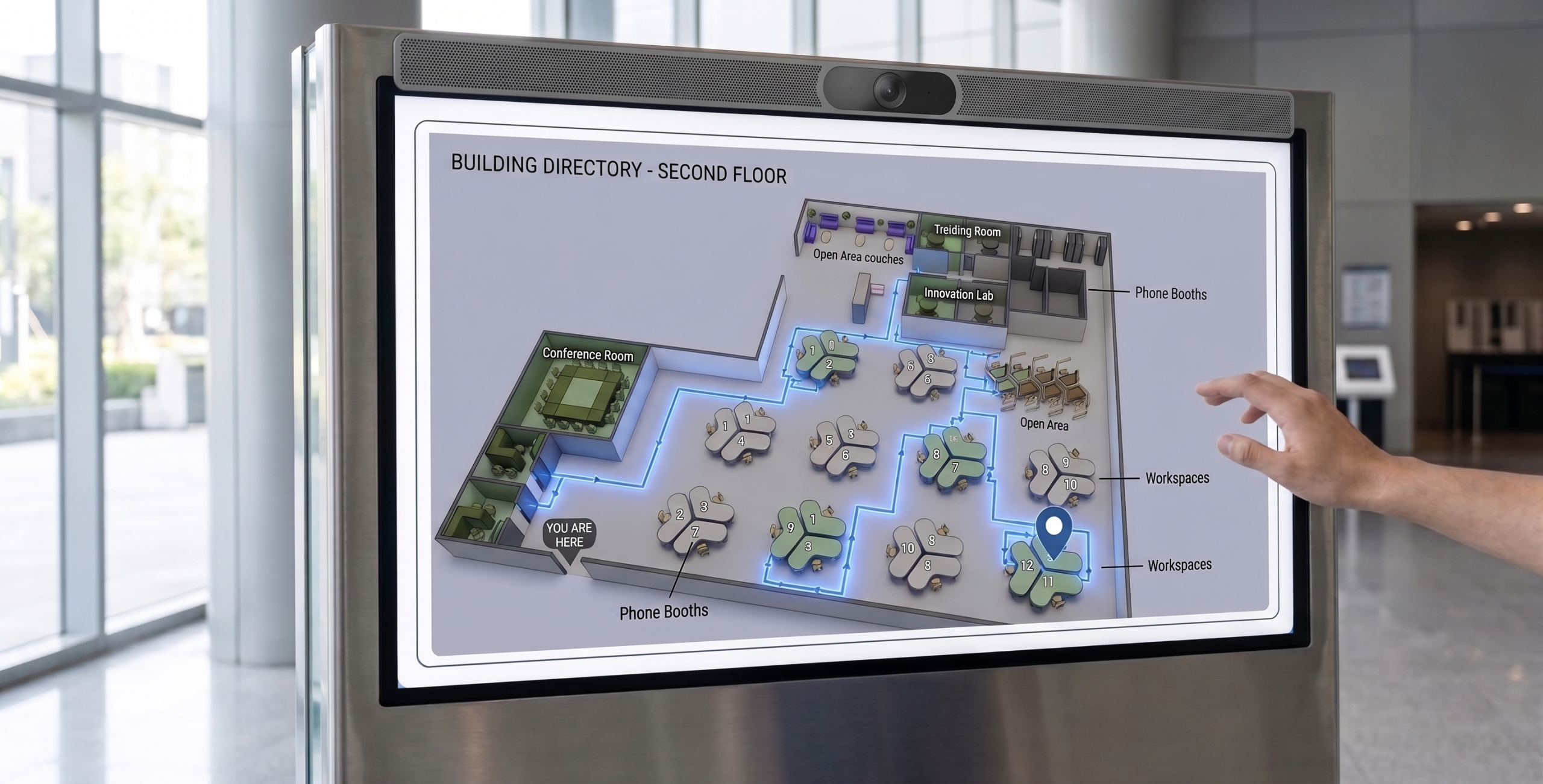
🌟 Highlight Feature: Interactive Wayfinding on Signage
Getting lost in a large corporate office is a thing of the past. Admins can now create navigational paths directly on the floor plan to be displayed on your office signage. This interactive wayfinding allows both employees and visitors to visualize their route on the big screen and find their way to meeting rooms, desks, or event spaces effortlessly.
Version 4.50 Detailed Updates
Key Focus: Booking Control & Flexibility
- Booking Management: Added a “Time Suggestion” feature within Business Hours to recommend specific time slots to users. The booking form now includes a “Booking Purpose” field, the ability to reorder custom fields, and disables the “Number of room users” field by default.
- Booking Policies: Introduced support for user group quota policies, Time Sector Restrictions, and a new “Booking Host” feature.
- Out-of-Hours Handling: Added an “Out of Service Hours” warning that alerts users without blocking their booking flow, alongside a setting to control whether notifications are sent for out-of-service-hour bookings.
- Booking Imports: Upgraded the import process to let admins specify room user counts and booking purposes. The system now automatically bypasses failed entries and continues importing the rest of the list without interruption.
- Interface Revamps: Completely revamped the user interface for the Resource Selection process to make booking faster and more intuitive.
Key Focus: Visitor & Directory Management
- Visitor Experience: Added the ability to invite visitors directly to specific floors, alongside a revamped Location Selection UI. Receptionists and hosts can now print visitor badges directly when scanning a visitor QR code to register via a mobile phone. We also introduced a new key for visitor registration and revamped the Visiting Purpose selection UI.
- Custom Data Fields: Introduced “Visitor Attributes” and “User Attributes,” allowing admins to create custom data fields tailored to their organization’s needs.
- Assignable Roles: Added “Assignable Roles” inside the Directory, enabling admins to create and assign custom operational roles to specific resources and locations.
Key Focus: Signage, Maps & Device Connectivity
- Floor Plans: Fully redesigned the Floor Plan Editor (Map) for a smoother, better user experience.
- Signage Workflows: Revamped the workflow for connecting signage devices and improved the UI for connecting printers. We also added a countdown timer to all forms displayed on signage.
- Panel Settings (Device): Added a setting to keep the QR code persistently visible on panel screens, and a new feature to suspend the sensor auto-checkout function directly from the booking panel.
Key Focus: Security, Attendance & Communications
- Security Protocols: Implemented Content Security Policy (CSP) Reporting, added new configurable policy permissions, and enhanced security protocols for saving and storing images.
- Attendance & Events: Added a selfie capture feature for attendance tracking and improved overall Event Management features and workflows.
- Broadcasts: Introduced a powerful Emergency Warning feature to instantly display safety alerts across all connected devices.
- Support Tickets: Updated support ticket policies to allow sending notification emails directly to configured Assignable Roles for faster issue resolution.
Key Focus: General App Enhancements & Bug Fixes
- General Enhancements: Improved photo capture quality across the platform by utilizing the device’s native camera. Upgraded formatting for all Note fields, improved the Offision Start Tour UI, and added a new filter option to the Resource Calendar in the User App.
- Bug Fixes:
- Fixed an issue where directly approved integration bookings incorrectly required a second manual approval.
- Fixed an issue where the specific location failed to auto-fill on the visitor registration form when scanning a visitor QR code.
- Fixed an issue that prevented the booking form from opening when clicking an available time slot shorter than one hour.
- Fixed an issue in the Offision application where using the “Print All” label function would incorrectly print duplicates of the same label.
👉 Next Step for Your Team: If you haven’t already, review these updates with your IT and Facilities managers. We highly recommend mapping out your Interactive Wayfinding paths on your floor plans and implementing User Group Quota Policies to instantly streamline office navigation and resource allocation.
For the complete, detailed technical release notes, visit our Release Notes page.
Onward and upward,
Ngai Kit Founder, Offision
Leave a Reply