
At Offision, we believe in making workplace management simple, intuitive, and accessible for everyone—no matter where you’re located or what language you speak. With that in mind, we are excited to announce that Offision now supports over 16 languages across our User Application, Management Console, and Panels!
Whether you’re in Europe, Asia, or anywhere in between, Offision provides seamless support in multiple languages to enhance the experience for diverse teams. We understand that a workplace tool should be easy to use, and language shouldn’t be a barrier.
Why Multilingual Support Matters
In today’s interconnected world, businesses often have teams spread across different countries and regions. Providing software that speaks your team’s language creates a more inclusive, comfortable environment where everyone can focus on what matters most—getting work done efficiently.
Our multilingual support isn’t just a feature; it’s part of our mission to ensure every user can interact with Offision comfortably, regardless of their native language.
Languages Currently Supported
Offision’s language support spans a broad range, including:
- English
- French
- German
- Hindi
- Indonesian
- Italian
- Malay
- Japanese
- Korean
- Portuguese
- Russian
- Spanish
- Thai
- Traditional Chinese
- Simplified Chinese
- Vietnamese
This extensive range means that your teams, wherever they are, can navigate Offision’s tools with ease.
Where Language Support is Available
- User Application: From booking desks to managing workspaces, users can interact with Offision in their preferred language.
- Management Console: Administrators can configure, manage, and track workplace analytics effortlessly, now in multiple languages.
- All Panels: From signage panels to booking screens, every part of your workplace can display information in the language that fits your team’s needs.
Expanding Support, One Language at a Time
As businesses become increasingly global, we are committed to continually expanding our language offerings. By supporting more languages, we hope to make Offision the go-to platform for workplace management across regions and industries.
We’ll continue to evolve Offision based on your feedback, adding even more language options and features that help you make the most of your smart office experience.
Changing your desired settings is easy
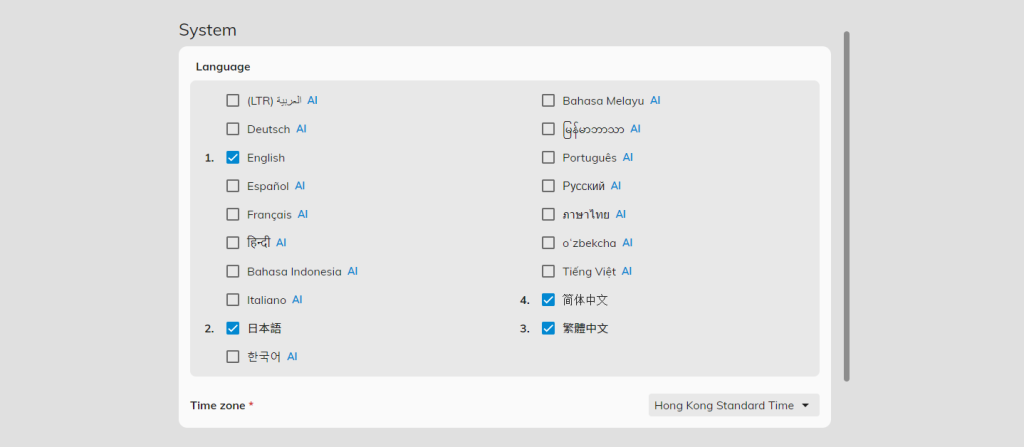
- Click on the Settings in either the mobile app or the web dashboard
- Click the dropdown in the Language section
- Select the language of your choice from the dropdown menu
Administrators can also pre-select a language of choice for the system.
Ready to see Offision in action?
If you’re already using Offision, simply switch the language preference in the app or management console settings and experience the difference. Not using Offision yet? Get started for free today and see how it can transform your workplace.
Experience Offision in your preferred language today!